
Iron County Court Calendars Explained
Michigan runs its Iron County public calendar through Court Display. It is built around dates. An entry can show a party name, time, room or hearing information, and case number. The detail depends on what the selected court publishes. That makes it a tool for locating a scheduled event. The register of actions remains the place to read the case events around it.
Know which court holds the matter. Check that before you trust any date. Most local traffic, civil-infraction, misdemeanor, ordinance, and district civil cases begin in 95B District Court. Circuit criminal, civil, family, and appeal cases belong to the 41st Circuit Court. Probate goes through the Probate Court. When the routing is unclear, the Iron County Trial Court directory is the practical source.
A date is only a scheduled setting. It does not prove the hearing happened. Nor does it show the case reached a disposition. Remember that when reading any public hearing entry.
Iron County Court Display Fields
The official Michigan Court Display opens with a dynamic selector for the court or display. Pick the local display. Then use Today, the previous-date and next-date controls, and the selected date to inspect the public events for that day. A busy day may add results navigation. Note the date you selected. Do not assume a listed event is the right one.
Michigan Court Display’s public calendar shell shows the date-based route Iron County court-date research follows.
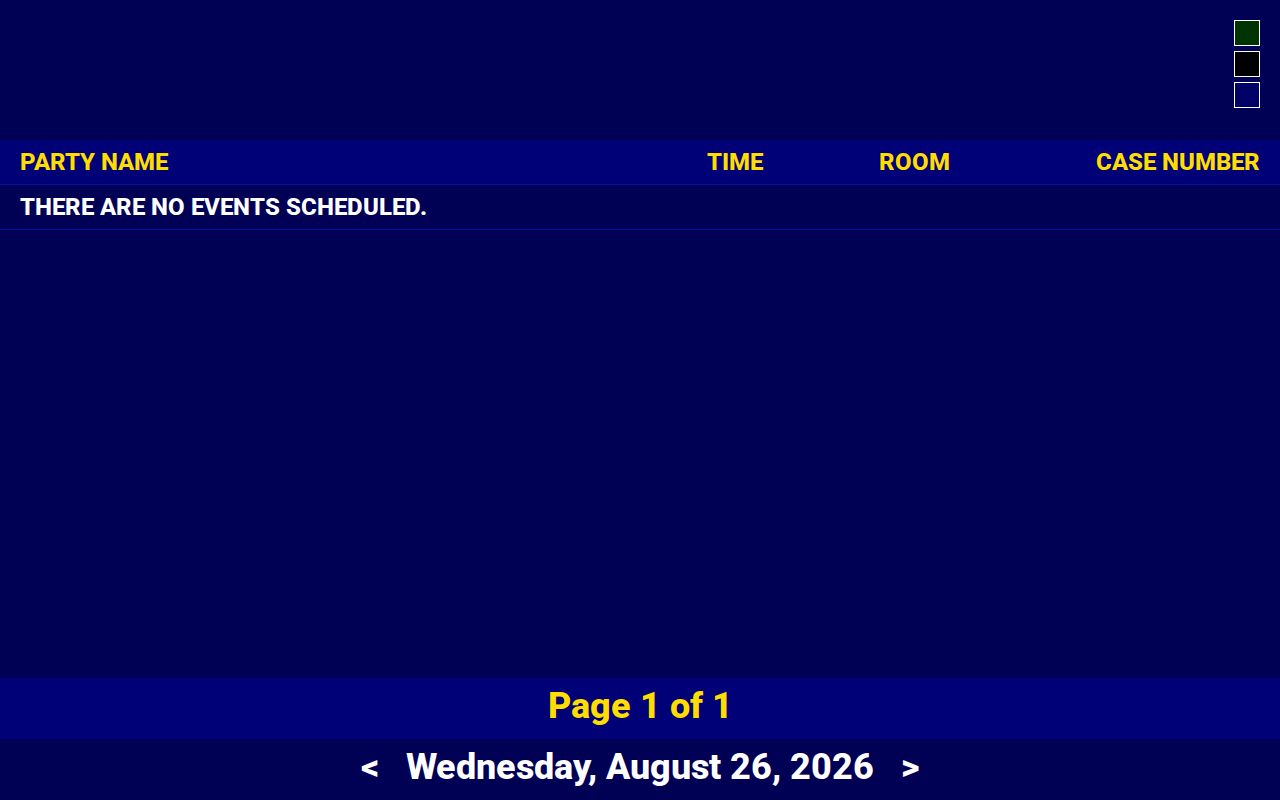
Treat the shell as a starting point. It does not promise a particular Iron County display or event will appear.
The official Court Display calendar view illustrates the public columns, which can include time, room or hearing information, and a case number.
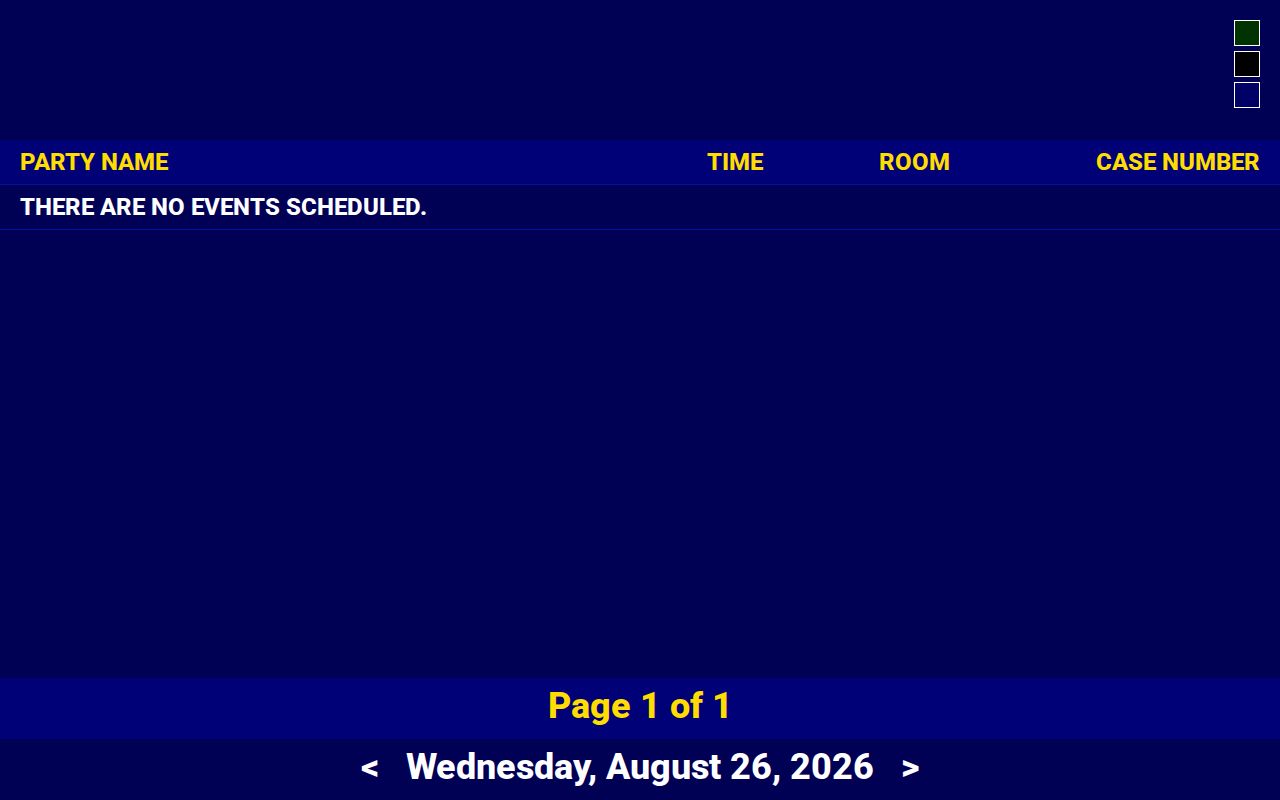
Write down only the fields actually shown for the court and date you picked. Local display configurations differ.
Finding Your Court Date
Work both paths: docket and calendar. If the result is missing or time-sensitive, move to a clerk channel. MiCOURT serves as the statewide informational case search. Court Display is the public date display. MiFILE/TrueFiling exists for authorized filers. It is not an anonymous public calendar or an ordinary public docket search.
- Identify the court from the case or citation. Use 95B District Court for most local traffic and district matters, the 41st Circuit Court for circuit matters, and the Probate Court for probate matters.
- Search MiCOURT Case Search by case number or public participant name. Select the local court and note the visible next hearing or case-history setting.
- Open Court Display, select the local display if it appears, and check the selected date plus adjacent dates. Compare its time, room, event text, case number, and party label with the case history.
- Use MiFILE/TrueFiling notifications only when you are an authorized filer or user. It is an e-filing and filer workflow, not the public calendar confirmation route.
- Call the responsible office: 95B District Court Clerk 906-875-0619; Trial Court 906-875-0659; Court Administrator 906-875-0625; County Clerk for circuit routing 906-875-3221; or Probate Registrar 906-875-0659.
- If a call fails, email the responsible department with a callback number. A written request may also be faxed to 906-875-0656 or mailed to 2 South 6th Street, Crystal Falls, MI 49920; name the court, case number, date range, and whether the request seeks a current or historic setting.
- For in-person confirmation, visit the clerk counter or ask whether a courtroom calendar is available during published Trial Court hours. Ask about the room, public-observation rules, remote-appearance authority, and any changed setting before travel.
When online entries disagree, trust the newer court entry plus clerk confirmation. A county payment route can settle an identified financial obligation, but it will not confirm a court date.
Iron County Court Calendar ID Gap
The official Court Display material for Iron County exposes no current Iron-specific display identifier. Choose a local court or display only when the live official interface presents it. Never invent an identifier. Never build a county URL from a generic example. A blank display does not mean the court has no pending matters.
Calendar check: If no Iron County display is visible, ask the clerk for the correct current public-calendar route and confirm the court, division, and date in the same contact.
How to Read a Court Setting
One field is never enough to read a setting line. Start by matching the case number and court. Then read the date and time alongside the room or hearing information. A party name on a public calendar identifies the case. It is not the whole file. A judge field may simply be absent. A CTN or hearing-type label should be read as displayed until the local court explains it.
| Date | The selected local calendar date. Save it with the date and time of your own capture. |
|---|---|
| Time | The scheduled event time shown by the display, which can differ from a general docket-call time. |
| Courtroom | The published room, hearing, or venue information. Confirm it with the clerk when travel or access matters. |
| Judge | The judge or division shown, if any. A missing field does not identify a different court. |
| Setting Type | The event label or hearing information, such as a hearing, pretrial, arraignment, or other listed setting. |
A scheduled hearing is not a disposition. The case history can still retain a continued or cancelled event even when the public calendar shows a different date or nothing at all.
Iron County Court Calendar and MiFILE
Court Display and MiFILE/TrueFiling solve different problems. Court Display publishes a date-based public presentation when the court makes a setting visible. MiFILE handles filing, case-specific links, and notifications for authorized users. The MiFILE available-courts directory confirms local 41st Circuit and 95B-2 entries. That does not make MiFILE a public court calendar.
- Case history
- The chronological register of actions maintained by the court, which can provide context for a next-hearing entry.
- Court Display
- A public date display that can show selected calendar events and limited identifying fields.
- MiFILE notification
- A filer-facing notice or link available through the authorized e-filing workflow, not a substitute for public calendar access.
Treat a Court Display result as a dated public observation. Call the clerk or coordinator when a party needs to know whether the court changed the setting or approved a particular appearance method.
Continuances, Resets, and Cancellations
A continued, adjourned, or reset hearing means the setting moved. That is all it means. It decides nothing about the case. Nor does it say why the court moved the event. A cancelled or removed calendar entry can linger in the case history, and the next setting may not show up in the public display yet. Search the register of actions. Call the responsible clerk rather than reading a removed item as a dismissal.
Iron County court calendars can change after you view them. Save the source URL, selected court, selected date, visible time, room, case number, event label, and capture time. If a display says "There are no events scheduled," the exact conclusion is narrow. No public event appeared for that selected court or date.
Note: the court's current order or docket setting controls. A calendar image only evidences what appeared when captured, not a permanent scheduling notice.
Iron County Court Settings That Move
A hearing date that looks off deserves a second check. Compare the MiCOURT case history against Court Display before you do anything else. When the case history is the newer of the two, give it more weight. Then reach the clerk or coordinator by phone. One caveat: the court publishes no single remote-appearance rule covering every Iron County hearing. Ask about your specific event. Include whether videoconference, in-person attendance, or public observation is allowed.
Phone trouble hit the courthouse in April 2026. Incoming calls failed at times. If the direct line will not connect, email the department listed in the Trial Court directory. Add a callback number. That route gets your question to the right desk. It never replaces a court order, docket entry, or formal notice.
If You Miss a Court Setting
Missed a setting? Move fast. Call the clerk for the court of record, and loop in your attorney if you have one. Ask what the public case history shows, whether a new setting has been added, and whether the court expects a filing, an appearance, or something else. A blank calendar entry settles nothing. A payment page tells you nothing about the next court step either.
Missed setting: A failure to appear can have case-specific consequences, so contact the responsible Iron County clerk immediately and follow any court order, citation, or attorney instruction.
Protected, juvenile, and sealed matters stay off the public calendar. So a missing event can hide a real case. Ask the clerk for the lawful access route instead of guessing at details the docket withholds.
Iron County Court Calendar Empty Dates
An empty Court Display date has several possible causes. The public schedule may simply be blank for that day. You might have the wrong display selected. The page may have failed to load fully, or the setting itself may not be public. None of this means no case exists. Iron County also posts an official county events calendar. It is handy for local scheduling, but separate from the Court Display hearing calendar. Do not treat it as a way to find a court setting. It lists county-government events, not court dates.
Need an actual case date? Go back to Court Display, MiCOURT, and the clerk of the court of record. A county event listing is no substitute.
A written Iron County calendar request works best when it says exactly what you want: the next scheduled setting, all public settings within a date range, or a certified docket entry showing a setting. Each is a different request with possibly different responses or copy fees. List the case number, the public case title or party name, the court or division, the date sought, and how you want delivery. The clerk can tell you whether an electronic response, paper copy, or certification process is available. If the display you selected belongs to another division, keep the department name in the request. The District Court Clerk routes 95B questions, the County Clerk handles circuit-record routing, the Probate Registrar answers probate access questions, and the Court Administrator takes broader trial-court scheduling questions. Naming the right office keeps a calendar question from being treated as a general county request.